AutoSleep — A Year of Sleep
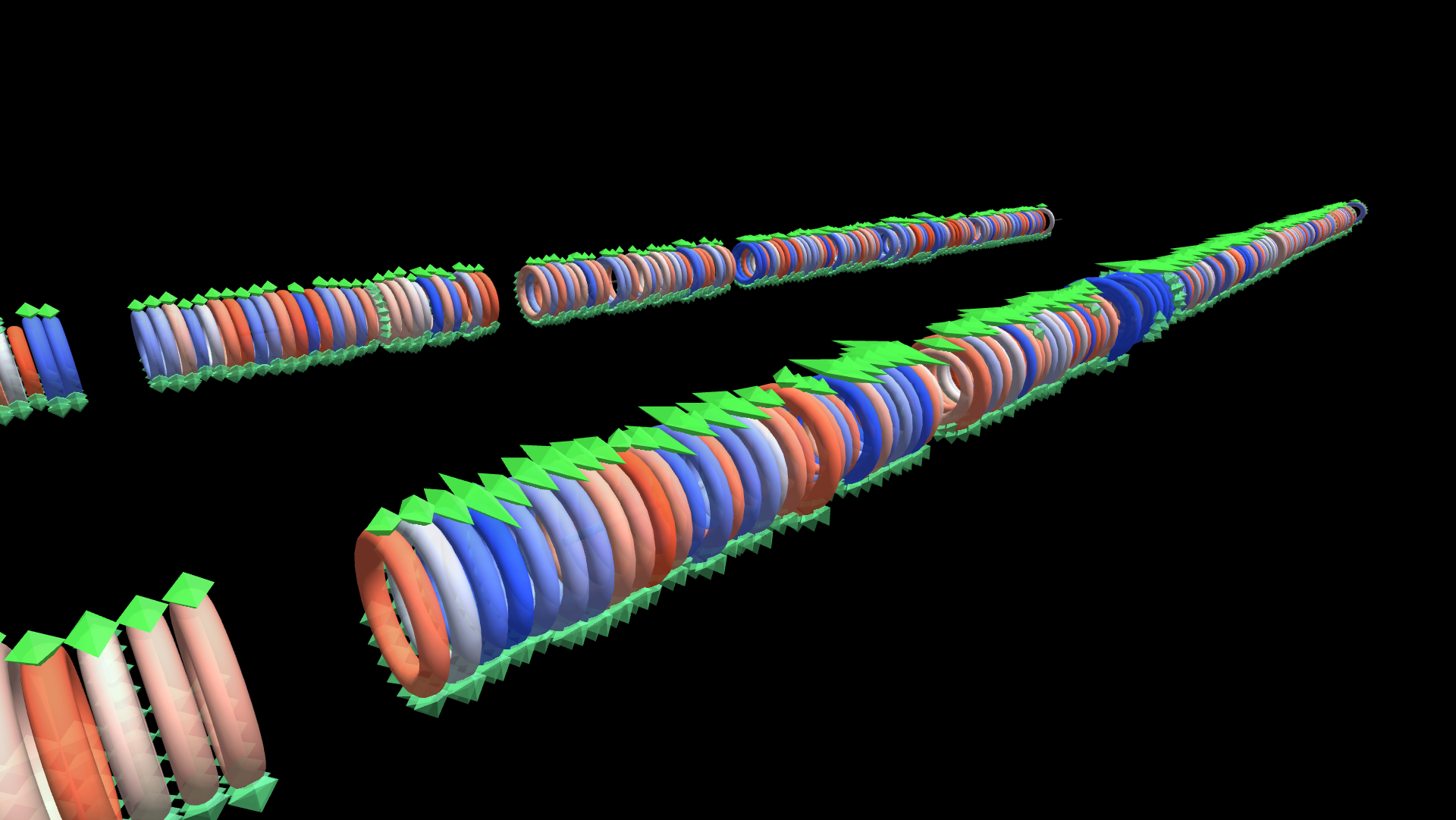
A year of Apple Watch sleep data: one Rod-topology cylinder per month carrying a Torus ring per day, each ring fringed with one small octahedron per slept hour plus a taller one marking that day's deep sleep — ring color diverges blue/red with deep sleep vs. your own 7-day trend.
Try it: download this example below (or the full examples set), then open AutoSleep_2025_Example/autosleep_2025_gv_node.csv — or just drag its folder onto the GlyphViz window.
Download this example (166 KB)
What it is
Nearly two years of one person's sleep, recorded by an Apple Watch and the AutoSleep app, drawn as a row of ribbed pipes. Each pipe is a month, each rib is a night, and each little spike around a rib is an hour slept. It is a quick way to see whether a month was long or short, steady or ragged, deep or shallow, without opening a single chart.
The scene covers January 2024 to the start of October 2025: 22 months and 609 nights, laid out left to right in calendar order.
How to read it
| What you see | What it encodes |
|---|---|
| One thin, nearly transparent cylinder per month | the spine of the month; the nights ring off it in date order |
| One torus (a ring) per night | that night's sleep. Its size is the total hours slept, so a long night is a fat ring |
| A fringe of small octahedra around each ring | one spike per hour asleep, placed by the clock hour it fell in, so the fringe shows when the night happened as well as how long it lasted |
| One taller octahedron at the top of each ring | deep sleep. Its height is the number of hours of deep sleep that night |
| Ring colour, blue to red | deep sleep compared with the person's own seven-day average: blue nights were deeper than the recent trend, red nights shallower |
Neighbouring rings overlap just enough that a month reads as one continuous ribbed pipe. The gap between one month and the next is about five nights wide, so the months are separate objects but clearly a single timeline.
Click a ring to see that night's numbers: date, hours slept, deep hours, the seven-day deep average, and when the sleep started and ended. Click a spike for its clock hour.
What the data shows
The colour does the most work. Scan along the row and a run of red is a stretch of shallow sleep; a run of blue is a recovery. The tall deep-sleep markers at the very start are real: Apple changed AutoSleep's deep-sleep detection partway through this record, and from 14 January 2024 onward the app almost never reports more than an hour of deep sleep. The first two weeks of January 2024 therefore have markers several times taller than anything after them. That is the data, not a rendering fault, and it is a good reminder that a visualization shows what the instrument measured.
Things to try
- Fly along a month. Use Camera Mode or orbit in close: seen end-on a month is a ring-shaped tunnel, and seen from the side it is a ribbed pipe.
- Look for the rhythm. The hour fringe is placed by the clock, so a person who sleeps from 22:00 to 06:00 draws the same arc on every ring, and a night that slipped later shows up as the arc sliding around the ring.
- Compare the months by size alone. A month of fat rings was a month of long nights.
How it is built
The scene has three branch levels: 22 month spines (Rod topology), 609 night rings (Torus topology) hung from them, and 5,883 hourly and deep-sleep octahedra (Sphere topology) hung from the rings, 6,515 nodes in total, with a black World row and tags for every node. Day rings are rotated a quarter turn so that the deep-sleep marker's fixed position on each ring lands at the top, and every ring has a uniform scale so that a child's proportions survive intact into world space.
The script autosleep_2025_glyphviz1.py builds the scene from an AutoSleep CSV export (Settings > Export CSV in the app). The export is personal health data, so it is not included; the finished scene files are, and load directly. To see your own year, export your data and run the script, which has four profiles (AllLayers, DaysPlusDeep, HoursOnly and MonthsOnly) to choose how many levels are drawn. The script's docstring records every design change made along the way, including the ones that came from reading the first render critically.
This scene is static: nothing in it is animated.