GTD — Event Cloud
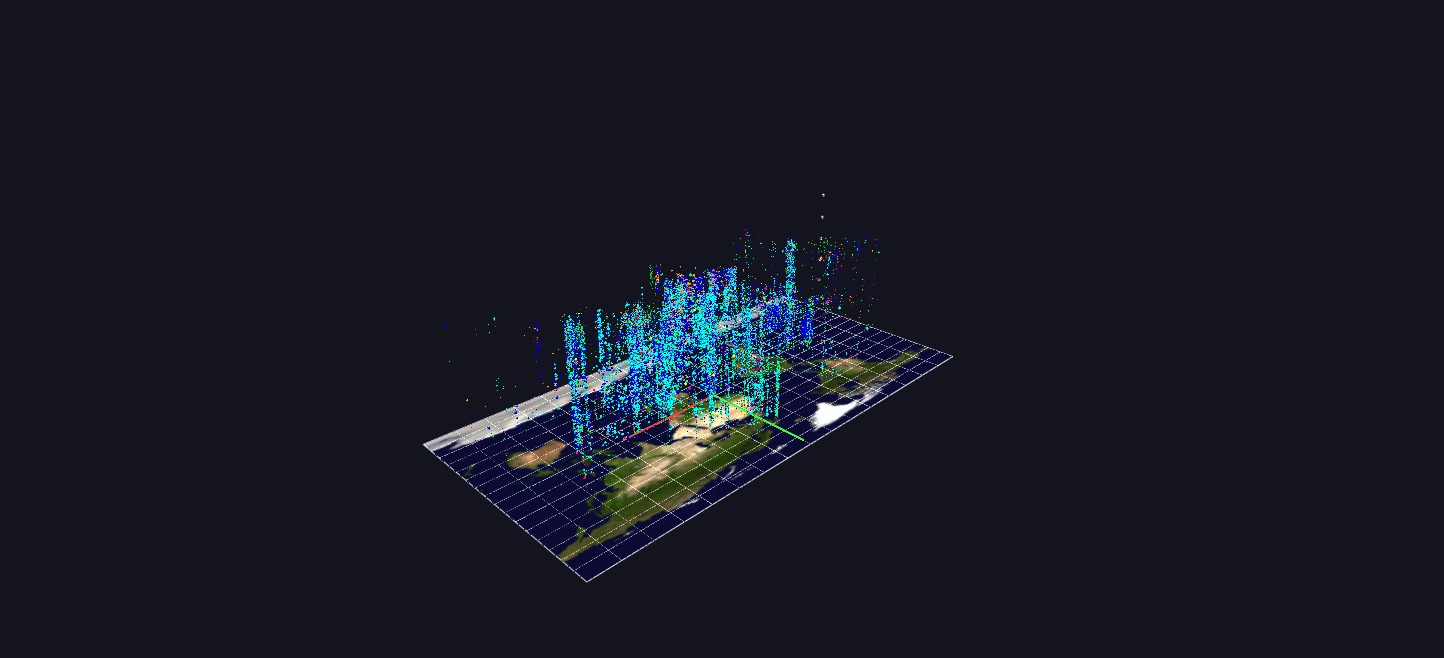
No aggregation: every incident in the database (about 210,000) is one octahedron placed by longitude and latitude, with altitude as date and color as attack type — a half-century of events as a single cloud, and a deliberately large scene.
Data: Global Terrorism Database (START, University of Maryland), 1970–2020.
Try it: download this example below (or the full examples set), then open Global_Terrorism_Example/Event_Cloud/EventCloud_gv_node.csv — or just drag its folder onto the GlyphViz window.
What it is
Every incident in the Global Terrorism Database, 1970 to 2020, as one glyph. There is no aggregation and no sampling: 209,705 incidents, 209,705 octahedra, in a scene of 209,712 nodes. It is the plain, whole picture, and it is deliberately one of the largest scenes in the gallery, so it takes a moment to load and rewards a decent graphics card.
The cloud stands on a real map of the world. Where an incident happened is its position on the map; when it happened is how high it floats above it. A half-century becomes a column of events that rises from the ground.
How to read it
| Axis or property | Meaning |
|---|---|
| X | longitude |
| Y | latitude |
| Z (height) | date, at two world units per year, so 1970 sits at the map and 2020 about 100 units above it |
| Colour | attack type, using the same legend as every other GTD scene (green assassination, blue armed assault, cyan bombing, and so on; see Organization Profiles for the full list) |
| Size | the log of killed plus wounded, with a floor so that events with no casualties stay visible |
Incidents with no recorded coordinates are placed at the centre of their country, computed from that country's geocoded incidents. Under the cloud lies NASA's Blue Marble image on a World Grid, and a few markers along the height axis label the decades.
Click any event for its label: the organization, the date, the city and country, the attack type, the target and the casualties.
What the shape shows
You do not have to read individual events to see structure. Fly out and look at the whole column:
- The cloud is bottom-light and top-heavy. Of the roughly 209,700 incidents, about 6,800 fall in the 1970s, 29,000 in the 1980s, 32,000 in the 1990s, 21,000 in the 2000s and about 119,000, more than half, in 2010 to 2020. The cloud thickens sharply near the top.
- Clusters stand out as pillars. A country with long-running violence is a column that stays full across many heights; a conflict that ended is a stub near the bottom.
- Colour layers show the mix of methods. Look at which colours dominate in a region at a given height.
Look from directly above and you have a map of where; look from the side and you have a history of when.
Things to try
- Roll the map into a globe. The map is a World Grid. In the World Grid panel, set Shape to Sphere: the map wraps into a globe and every event moves to the same longitude and latitude on its surface, with date becoming distance out from the surface instead of height above the plate.
- Isolate one kind of attack. Every label contains the attack type, so in the Select By group type Bombing (or Kidnapping, or Assassination) into Tag contains and press Select Matching Tags.
- Slice by time. Frame a horizontal band to read a single decade.
How it is built
The scene is one World Grid and about 209,700 children, each placed by longitude and latitude on the grid, so that the whole cloud can be switched between flat and globe. It is a single file with no animation; the scene is drawn from a retained display list, which is what lets 200,000-plus glyphs stay interactive. The generator, generate_gtdb_examples.py in the parent folder, reads the START spreadsheet (about 100 MB, which takes a couple of minutes to parse the first time) and builds all five GTD scenes.
Source: Global Terrorism Database, START, University of Maryland. Map: NASA Blue Marble.