Channel Parameters
A test bench of seven labeled stations, one per Channels-bindable attribute family — ratio, topo, geometry, color_index, palette_id, hide, show_text — each driven by its own channel. The ch-map file doubles as a legend, and the 8-second loop runs every station at once.
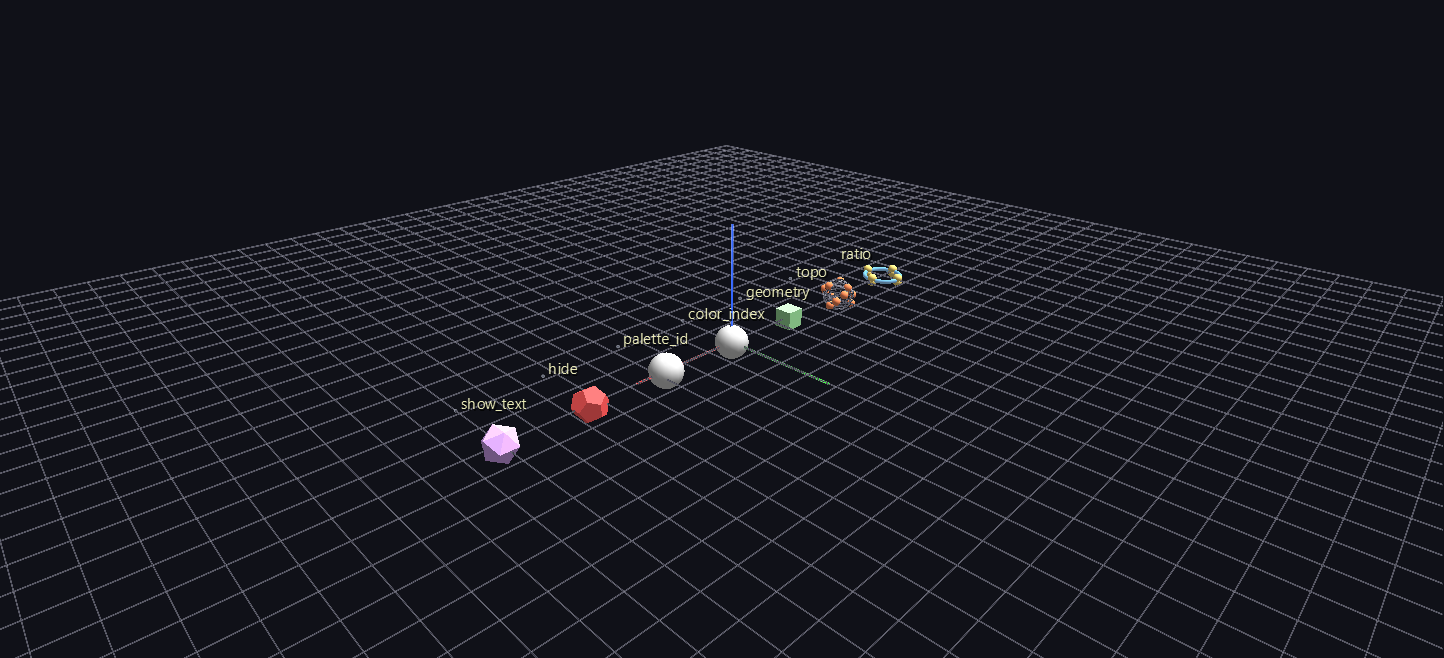
Try it: download this example below (or the full examples set), then open Channel_Parameters_Example/channel_parameters_gv_node.csv — or just drag its folder onto the GlyphViz window. Press Space to start the animation.
What it is
A test bench. Seven labelled stations stand in a row, and each one demonstrates a single Channels-bindable attribute: ratio, topo, geometry, color_index, palette_id, hide and show_text. Every station has its own channel and a single track, and the Channels map file reads as a legend, one line per station. The loop is 8 seconds long (240 frames) and runs every station at once.
Press Space to play, then walk down the row and watch each station do the one thing its label says.
What each station does
| Station | Attribute | What to watch |
|---|---|---|
| 1 | ratio |
a torus tube swells, and its 8 children ride the swell apart and inward |
| 2 | topo |
a parent's 12 children re-lay-out as the topology steps Sphere, Torus, Cylinder, Cube, Spiral |
| 3 | geometry |
one glyph cycles through eight solid shapes |
| 4 | color_index |
a single track sweeps the 128-entry Rainbow Heatmap palette |
| 5 | palette_id |
one glyph steps through all 26 built-in palettes at a fixed index |
| 6 | hide |
a glyph strobes, four frames on and four off |
| 7 | show_text |
a tag label pops on for 12 frames once a second |
Stations 1 and 2 are the important ones. ratio, topo and geometry re-place a node's children, not just its own appearance, so those stations show a whole subtree rearranging from a single track. The other attributes change only what is drawn.
Two subtleties worth knowing
The topology station and Topology Scale. Station 2's 12 children are placed in degrees (translate_x from 0 to 330), which is what Sphere, Torus, Cylinder and Spiral all want. Cube does not: it reads translate_x as a distance, so the same 330 would be 330 world units, and the children would vanish the instant the cycle reached Cube. The fix is that parent's Topology Scale, set here to ANTz's 1/180, which makes a linear axis span the parent's own extent. Select the station and press the ANTz and 1:1 buttons beside Topo Scale in the Properties panel to see the difference live. Topology Scale is itself bindable, so a scene can animate it alongside topo.
The torus station. Station 1's children sit at tube angles of 90° and 270°, not 0°. That is deliberate. A torus's major and minor radii always sum to its overall radius, so a child on the tube's outer equator sits in the same place for every value of ratio and looks completely static. Put children on the top or bottom of the tube to see the swell.
What it teaches
- One track can replace three. Station 4 changes how you author colour. A single track carrying a palette index replaces the three-track
color_r,color_g,color_bpattern whenever a built-in ramp is close enough, cutting the tracks file to a third of its width. Setpalette_idonce in the node file and animatecolor_index. - Integer flip-books need a beat.
topoandgeometryhold each value for a while before stepping. Stepped every frame, the scene reads as noise.
Not covered here
mesh_id is bindable too, but it selects among meshes imported at runtime, so it cannot be shown from a CSV alone. Bind it exactly like geometry once you have meshes loaded. The scene-wide settings (background colour, fog, blend mode) live on the World row and have their own example, Mood Background.
Regenerating
The scene is 35 nodes, and the generator generate_channel_parameters.py rewrites all three CSVs. Its build_tracks() function holds each station's track in a few lines, and TOPO_CYCLE and GEO_CYCLE at the top control what stations 2 and 3 step through.