GTD — Campaign Pulse
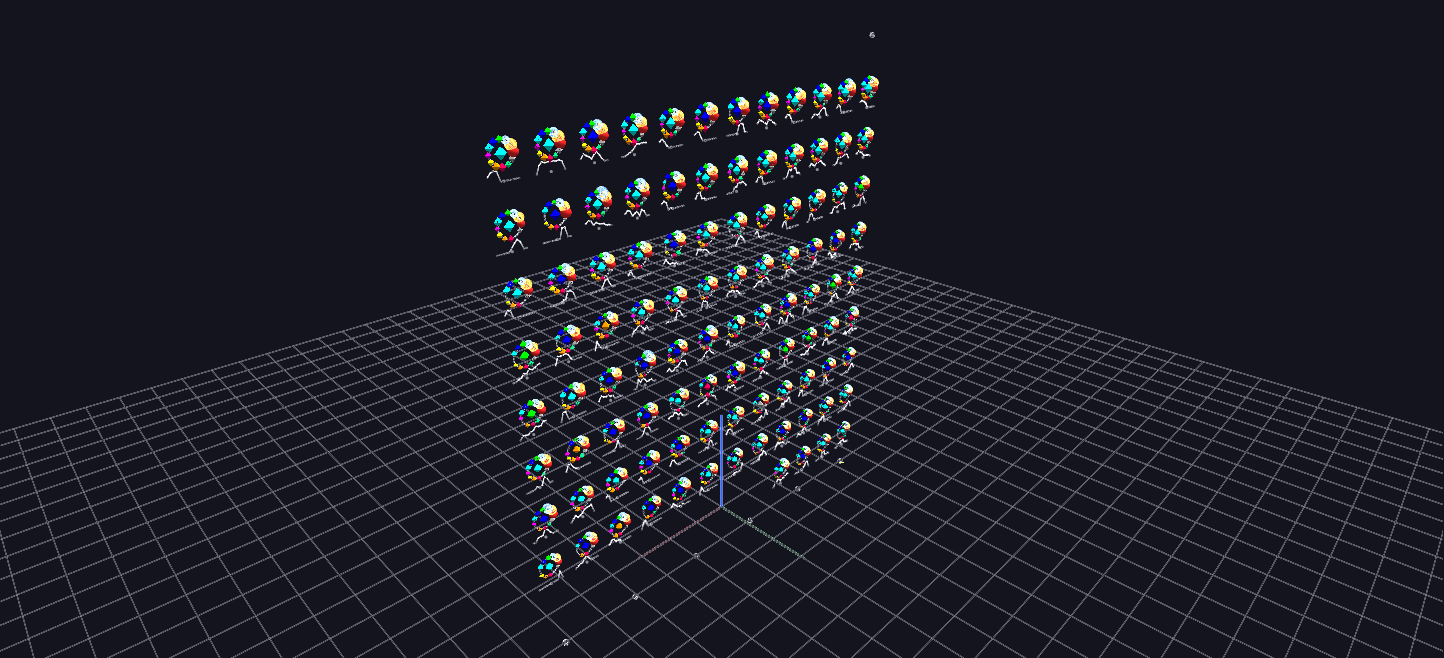
Campaigns breathe: the rosette wall for the top 100 organizations animated on the same half-month clock — each rosette swells and spins with its organization's trailing-12-month activity relative to its own historical peak.
Data: Global Terrorism Database (START, University of Maryland), 1970–2020.
Try it: download this example below (or the full examples set), then open Global_Terrorism_Example/Campaign_Pulse/CampaignPulse_gv_node.csv — or just drag its folder onto the GlyphViz window. Press Space to start the animation.
Download this example (320 KB)
What it is
Take the wall of rosettes from Organization Profiles, keep the 100 most active organizations, and let them breathe. Each rosette swells and shrinks with how active its organization is, and its ring spins at the current level of activity. Press play and the wall becomes a synchronized census of fifty years: some glyphs surge, some freeze, and some fade away.
The clock is the one the Time Replay scene uses: every frame is half a month, 1,224 frames from 1970 to 2020, so the two scenes can be read together.
How to read it
- Size is activity right now, measured against the organization's own best. A rosette's size follows its trailing-twelve-month attack count as a fraction of its own historical peak. At full size, the organization is at its peak at that moment; at a nub, it is dormant. Because each organization is measured against itself, a small group at its peak looks as large as a big group at its peak.
- The ring spins at the current intensity. A campaign in full swing visibly churns. A defeated organization freezes mid-pose, with its ring stopped where its last attack left it.
- The ring's angle is cumulative. The rotation track is an absolute angle that grows with every attack, so the total number of turns reflects total attacks. This makes scrubbing the slider work, and Reset restores the exact starting pose.
- A time cursor sits below the wall. Its position is the current date, from 1970 on the left to 2020 on the right, and its height is the number of attacks per month by these 100 organizations.
- The layout and colours are those of the profile wall: most active top left, the 12-slot ring, the same attack-type colours.
Watch for the handovers. The glyphs don't know about each other, but you will see one organization fade as another rises: Shining Path in decline as the LTTE rises, al-Qaeda's spike against the Taliban's long burn, and the ignition of ISIS in 2014.
Things to try
- Play at 15 to 30 frames per second. At about 2,500 nodes the scene stays smooth at that speed.
- Pick one organization and track it. Select its rosette, then play and watch it from a distance; its label has its name and summary.
- Stop on a date and read the whole wall as a snapshot of who was active that month. Everything at full size is at its peak.
- Compare a peak with a survival. An organization that spiked and vanished and one that stayed at a lower level for decades pulse very differently, even if their totals match.
How it is built
The scene is 2,470 nodes: 100 rosettes, each with a ring, a Plot-topology line and its ring objects. The animation has 402 mappings over 1,224 frames, on two things per rosette, its size (scale_x, scale_y and scale_z) and its ring's rotation (rotate_z), plus the position and height of the time cursor. The generator is generate_gtdb_examples.py in the parent folder.
Source: Global Terrorism Database, START, University of Maryland.