Vehicle Sales — Market Galaxy
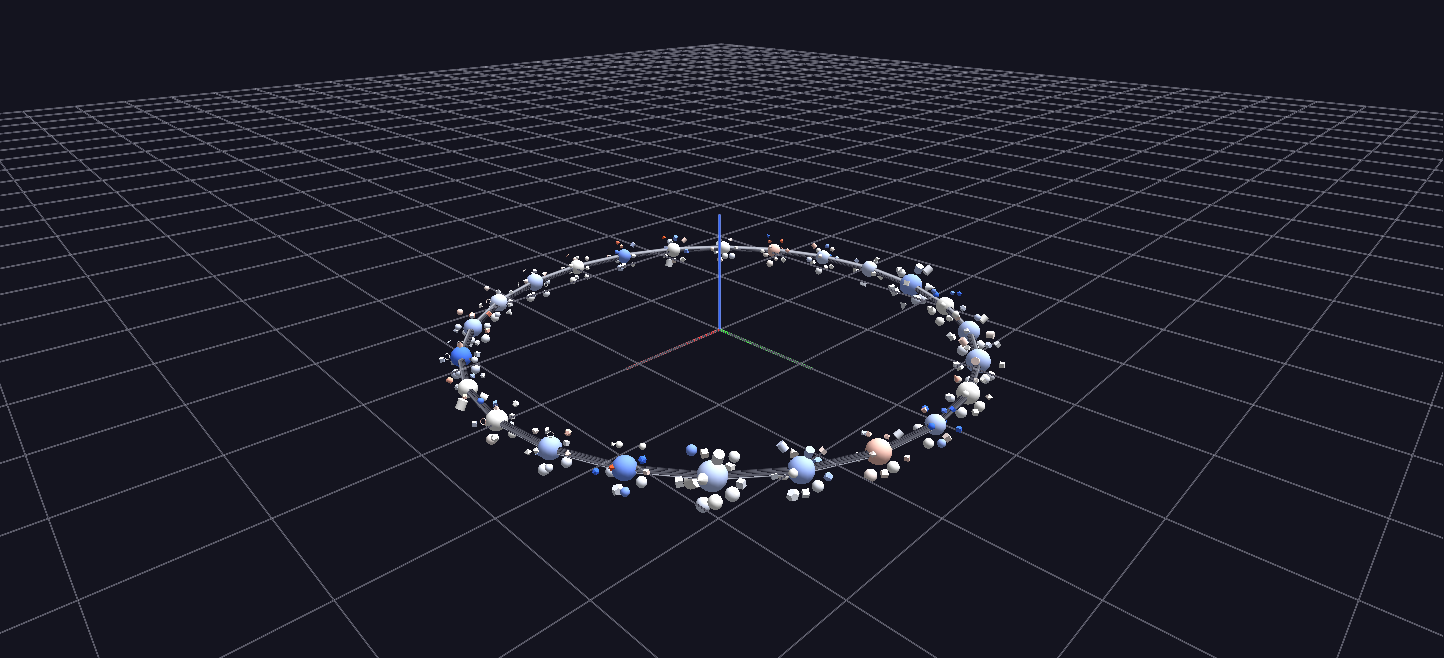
The top vehicle makes on a slowly rotating torus ring, each make a sphere with its top models orbiting it: ring position runs cheap to luxury, size is sales volume, color is selling price versus wholesale book value, and each model's geometry encodes its dominant body style.
Data: Kaggle used-vehicle auction dataset (~559,000 sale records).
Try it: download this example below (or the full examples set), then open Vehicle_Sales_Example/Market_Galaxy/VehicleGalaxy_gv_node.csv — or just drag its folder onto the GlyphViz window. Press Space to start the animation.
What it is
The used-car market as a small orbiting galaxy. A slowly turning ring carries the 24 biggest makes, each one a sphere, ordered around the ring from cheapest to luxury. Round every make orbit its best-selling models. When you press play, the whole ring starts to breathe with the weekly rhythm of the market.
The data are Kaggle's used-vehicle auction records: 543,000 sales between January 2014 and July 2015. They are boiled down to 300 glyphs whose every visual property carries a statistic, so structure in the market you were not looking for shows up on its own.
How to read it
A make (a sphere on the ring):
| Property | Meaning |
|---|---|
| Position on the ring | price, with the cheapest makes at one end and luxury makes at the other |
| Size | sales volume, on a square-root scale |
| Colour | the median selling price compared with the wholesale book value (MMR): blue means it sells under book, white at book, red over book |
A model (a smaller glyph orbiting its make):
| Property | Meaning |
|---|---|
| Shape | the model's dominant body style: sedan is a sphere, SUV a cube, truck a cylinder, coupe a cone, convertible a torus, van a dodecahedron, wagon an icosahedron, hatchback an octahedron, anything else a tetrahedron |
| Height above its make | median odometer reading. Models with more miles on them orbit higher |
| Size | sales volume within the make |
| Colour | price against book value, as for the make |
Click anything for its figures, for example Mazda | 8387 sold | median $9.7k | +0.0% vs MMR | 52k mi, or Mazda Mazda3 [Sedan] | 2872 sold | median $9.6k | +0.3% vs MMR | 49k mi.
The colours are subtle because the comparison is tight. MMR is itself the market's median, so a make's median price against it only drifts by a fraction of a percent: across the 24 makes the spread runs only from about −0.9 percent to +0.3 percent. The colour scale is stretched to that real range, so what looks like a strong blue is a real, small tendency. Mercedes-Benz sells under book and Honda over.
The market pulse
Press Space and the ring comes to life. The generator has replayed the sales by week, from December 2014 to July 2015, at 12 frames per week, 372 frames in all, about 12 seconds. Each make follows its own weekly sales:
- Its size breathes with that week's sales volume, so a make swells in busy weeks and shrinks in quiet ones.
- It bobs above or below the ring by how far that week's median deal ran over or under book value.
That takes four bindings for each of the 24 makes (its three size axes and its height), 96 in all. The ring also turns by itself, slowly, at a rate of a lap in about five and a half minutes.
Things to try
- Find the heavy hitters. The biggest spheres are the makes that sold most. Click one and read its figures.
- Look for high orbits. A model orbiting well clear of its make has a higher median mileage than its siblings.
- Select by shape. In the Select By group choose Geometry → Cube to pick every SUV at once, or Cylinder for trucks.
- See it from the side. Bobbing above and below the ring is easiest to read side-on, when playback is running.
- Compare with the grid. Depreciation Grid shows how price falls with age for the same makes.
How it is built
The scene is 300 nodes: a ring, 24 make spheres with Sphere topology, and 274 model glyphs orbiting them. The generator is generate_vehicle_sales_example.py, which also builds Depreciation Grid and Raw Auction Field.
A detail worth noticing if you build something like this: the ring's radius is not made by scaling a big parent. A large root would multiply every child's size and, with the renderer's minimum-size handling, balloon them. Instead the makes are placed at explicit positions on the ring, with absolute sizes of their own, and the wire torus is only decoration.
Data: Kaggle used-vehicle auction dataset.