SES Achievement Gap Terrain
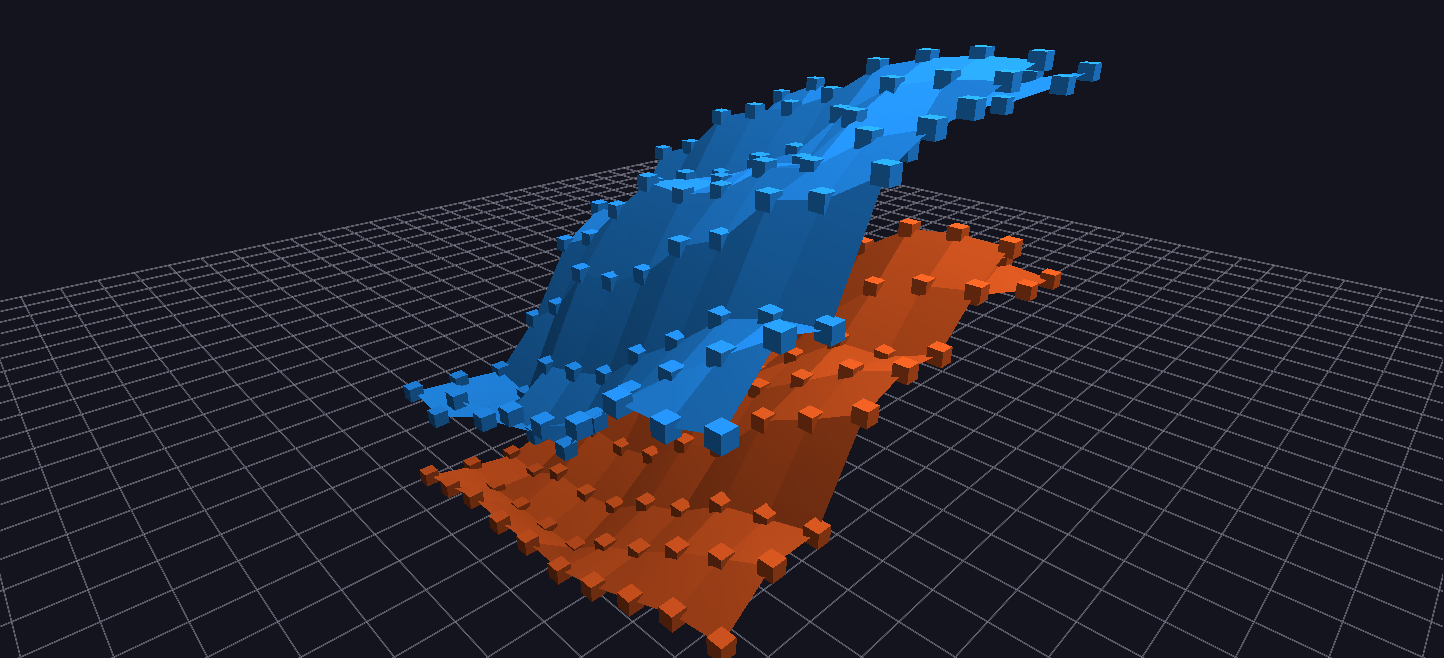
Two stacked Surface-topology meshes over the same (grade, year) grid — average proficiency for economically disadvantaged and non-disadvantaged students — so the achievement gap is literally visible as the space between two terrains.
Try it: download this example below (or the full examples set), then open SES_Achievement_Gap_Terrain_Example/SES_Achievement_Gap_Terrain_Example_gv_node.csv — or just drag its folder onto the GlyphViz window.
What it is
The achievement gap between economically disadvantaged students and their peers, as a pair of landscapes. Two surfaces hang one above the other, built from the same San Diego Unified School District test results as California STAR Test Scores. One surface is the average proficiency of economically disadvantaged students; the other is that of students who are not. The vertical space between the two surfaces at any point is the achievement gap.
It is "the forest, not the trees": the district's ten years and ten grades folded into two shapes you can read at a glance, instead of a number per school.
How to read it
Both surfaces use the same grid:
- One axis is the grade, from grade 2 to grade 11.
- The other axis is the year, from 2003 to 2012.
- Height is the share of students scoring proficient or above, on the California Standards Tests, averaged across the district and weighted by how many students were tested.
The two groups are separated by colour. The disadvantaged surface is warm orange-red and the not disadvantaged surface is cool blue, so you can tell them apart wherever they cross. Within each, brightness follows proficiency from 40 to 100 percent of full, so the surface is also a heat map in its own hue. Every cell is a real grade and year, drawn as it is; nothing is interpolated.
What the scene shows:
- The gap is large and it persists. In this data it is 15 to 35 percentage points at every grade and every year.
- Both groups improve. Both surfaces rise across the decade. In grade 8, disadvantaged students go from 13.3 percent to 47.0 percent proficient and the others from 36.5 percent to 75.7 percent.
- The gap barely narrows. The two surfaces rise together, so the space between them stays open. A slope that rises on both is good news that a single average hides.
Click a point for its label, for example Grade 2 | 2003 | Economically Disadvantaged: 32.9% above proficient and the same cell for the other group.
Things to try
- Look along the year axis. Orbit so you are looking edge-on at one grade: the two surfaces become two lines, and the distance between them is the gap in that grade over time.
- Compare grades. Do the same along the grade axis for a single year.
- Find the narrow spots. Wherever the surfaces come closest, you have found the grade and year where the gap was smallest.
- Change the question. The generator takes any pair of student groups in the data. Two flags,
--group-a-codeand--group-b-code, choose them (disability status, or English learners against others, for example), with matching labels.
How it is built
The scene is 202 nodes: two Surface-topology roots and 100 points under each, one per (grade, year) cell. Surface geometry is described in Cowles Mountain Terrain. The generator, generate_ses_gap_terrain.py, reads either exported CSV files or a live MySQL database, and computes each cell as the average proficiency across the district, weighted by students tested.
Its sister scenes read the same data other ways: District Heatmap asks where, and California STAR Test Scores shows each school in detail.