RSS News Globe
A GlyphViz take on GaiaViz's RSS Viz concept: about twenty international news feeds in eight languages, concept mentions counted per outlet with a multilingual term dictionary and rendered as color-coded concept towers rising from a Blue Marble globe.
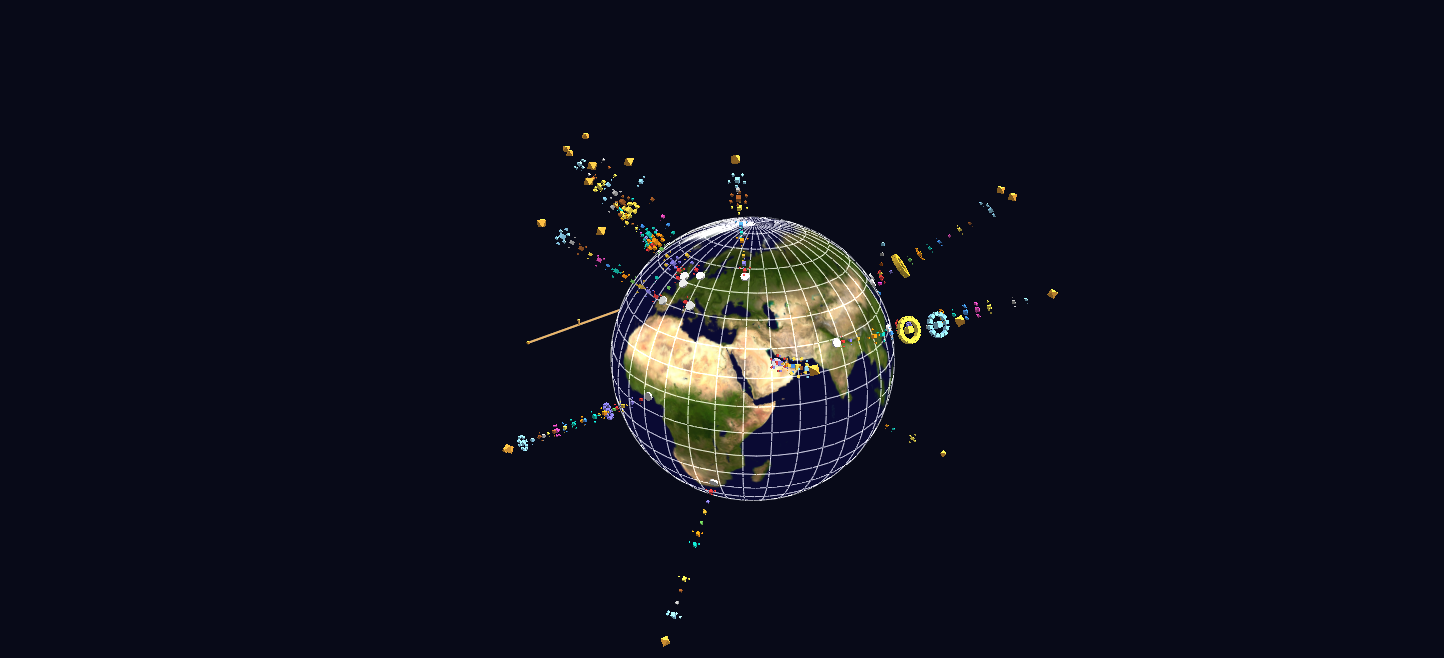
Try it: download this example below (or the full examples set), then open RSS_News_Example/rss_news_gv_node.csv — or just drag its folder onto the GlyphViz window. Press Space to start the animation.
What it is
A day of world news, counted by topic and stood up on a globe. Twenty news outlets from eighteen countries and territories (the BBC in London, TASS in Moscow, NHK in Tokyo, Al Jazeera in Doha, Punch in Lagos, and fifteen more) each get a tower rising from their home city. A tower is a stack of cubes, one for each of twelve concepts, and the size of a cube is the number of that outlet's recent articles that mention the concept.
The idea comes from GaiaViz's "RSS Viz", and the clever part is that the concepts are matched against dictionaries of search terms in eleven languages. A spike in "war" is therefore directly comparable between the BBC in English, TASS in Russian and NHK in Japanese, and you can spot patterns in outlets whose language you cannot read.
The scene is a snapshot. The feeds were fetched in July 2026, and the replay covers the final three days of coverage; the generator can re-fetch the feeds and rebuild the scene any time.
How to read it
| What you see | What it means |
|---|---|
| The globe | a World Grid in globe form, textured with NASA's Blue Marble |
| A white pad on the surface | a news outlet, at its home city. Its link opens the outlet's homepage |
| A tower of cubes | one cube per concept, at a fixed height for each concept, so war is always the lowest cube and sports the highest on every tower. Comparing two outlets is a glance across at the same level |
| A cube's size | how many of the outlet's articles mention that concept |
| A cube's colour | the concept; the legend is a column of coloured cubes floating west of the globe |
| A gap in a tower | the outlet did not mention that concept at all |
| Small cubes ringing a cube | one for every individual article that mentions the concept, in the same colour. Each one is that story: its label is the headline and its link opens the article |
| An amber octahedron at the top | the outlet's latest headline |
| An amber bar south of the globe | the timeline for the replay, UTC, with a spinning cursor |
The twelve concepts are war, election, economy, climate, energy, health, technology, AI, protest, disaster, migration and sports. The scene is more than a count: a cube labelled BBC News: war 3 is orbited by three small cubes, and each of them is a clickable article.
Things to try
- Press Space for the replay. Every cube dims to a faint baseline and flashes in the two-hour windows when articles mentioning its concept were published, while the cursor sweeps the timeline. Stop (Shift+Space) restores the static totals.
- Read a story. Alt+click a small article cube, a headline octahedron or an outlet pad, and the article or homepage opens in your browser. Selecting it and pressing U does the same.
- Switch labels on with T to read outlet names, concept counts and headlines. It gets busy, so try it on a selection.
- Compare outlets at one level. Look at the war cubes (the lowest on every tower) across the globe, then the sports cubes at the top.
- Press G to select the globe and open the World Grid panel, where the globe can be flattened into a map and back.
How it is built
The scene has 708 nodes. Each concept cube is itself a Sphere-topology parent, and its article cubes ring it at a fixed altitude, evenly spaced by longitude, so a concept with many articles gets a denser ring rather than a bigger single glyph. The replay is a Channels animation of 36 frames, one for each two-hour window of the three days, and every cube and its article children share a channel, so 165 channels animate the whole set.
The generator, build_rss_news_scene.py, fetches the feeds with Python's standard library alone and tolerates a failing feed. Counting is per article, so an article that mentions war five times counts once. It can also run as a loop: --watch 300 re-fetches and rewrites the scene every five minutes, and with File → Watch and Reload on, GlyphViz reloads it in place while you keep your camera, selection and playback state. Both the outlets (data/feeds.csv) and the concept dictionary (data/terms.csv) are plain files, so the same scene can follow any topic.